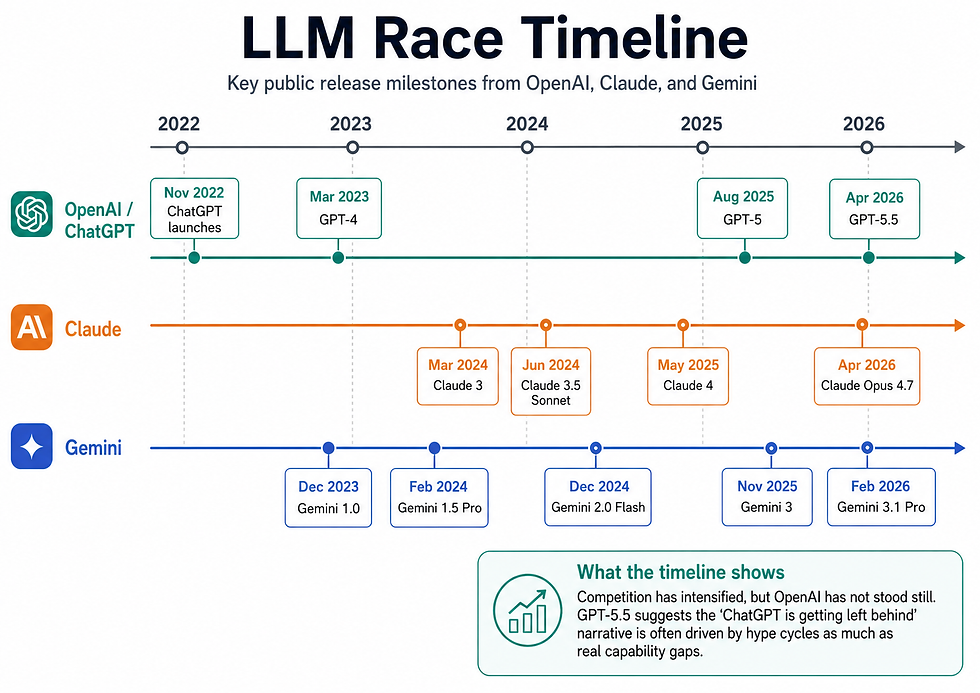
ChatGPT 5.5 for Business: How It Could Help Business Owners Work Smarter

AI tools are moving quickly, and for many business owners it can be hard to separate genuinely useful technology from hype. ChatGPT 5.5 is the latest major step from OpenAI, and it is being positioned as a stronger model for complex professional work, including research, analysis, writing, coding and internal business support.
For business owners, the important question is not simply “is ChatGPT 5.5 clever?” The better question is: can it help your business save time, reduce admin, improve customer service, support better decision-making or create new ways of working?
The short answer is yes, but only if it is applied to real business processes rather than treated as a novelty. ChatGPT 5.5 could become a valuable day-to-day assistant for many teams, but it is not the only option. Claude, Microsoft 365 Copilot, Google Gemini and GitHub Copilot all have strengths depending on how your business works.
This guide explains what ChatGPT 5.5 could mean for business owners, where it may help most, how it compares with key alternatives, and what to consider before adopting it.
What is ChatGPT 5.5?
ChatGPT 5.5 is OpenAI’s latest frontier model, designed for more advanced professional tasks. Compared with earlier models, it is built to handle larger amounts of information, follow more complex instructions and support deeper reasoning across business tasks.
In practical terms, this means it can help with things like analysing lengthy documents, comparing options, drafting reports, planning projects, reviewing data, summarising meetings and supporting more advanced automation workflows.
For a business owner, the value is not just in having a smarter chatbot. The real opportunity is using AI as a working layer across the business. That could mean helping your sales team prepare proposals, supporting your admin team with repetitive tasks, helping managers understand performance data, or giving staff faster access to company knowledge.
How ChatGPT 5.5 could help businesses
1. Saving time on everyday admin
Most businesses lose time to repetitive work. Emails, meeting notes, reports, summaries, follow-ups, document reviews and internal updates all add up.
ChatGPT 5.5 can help by drafting first versions, turning rough notes into structured documents, summarising long threads, creating task lists from meetings and helping staff respond faster. It does not remove the need for human judgement, but it can reduce the blank-page problem and speed up routine work.
For smaller teams, this can be especially valuable. Many business owners are stretched across sales, operations, finance, marketing and customer service. An AI assistant can help reduce the mental load of constantly switching between tasks.
2. Improving sales and proposal workflows
Sales teams can use ChatGPT 5.5 to prepare for calls, summarise prospect research, draft tailored follow-up emails, create proposal outlines and turn technical information into clearer client-facing language.
This does not mean replacing salespeople. The value is in helping them spend less time preparing documents and more time speaking to prospects, understanding needs and closing work.
For example, a business could use ChatGPT to turn discovery call notes into a proposal structure, identify missing information, suggest likely objections and draft a follow-up email. A manager can then review and refine the output before it goes to the client.
3. Supporting marketing and content creation
ChatGPT 5.5 can help businesses plan and produce marketing content more efficiently. It can support blog planning, social media ideas, email campaigns, website copy, customer FAQs, case study structures and content repurposing.
The key is to avoid using AI to produce generic content at scale. Search engines, customers and AI answer engines are becoming better at spotting thin content. The strongest use is to combine AI with your real expertise, examples, customer questions and proof points.
For a business owner, this could mean using ChatGPT 5.5 to create a content plan based on common sales questions, draft blog outlines, improve readability or turn one strong case study into several useful assets.
4. Better customer service and support
Customer service is one of the clearest AI use cases. ChatGPT 5.5 could help businesses create better FAQ content, draft support replies, summarise customer issues, classify enquiries and build internal support assistants.
For businesses with recurring customer questions, AI can help create faster and more consistent responses. This might include delivery updates, booking queries, product information, troubleshooting steps or service explanations.
However, customer-facing AI needs careful setup. It should be trained or grounded in accurate business information, and there should be a clear route to a human where the query is sensitive, complex or complaint-related.
5. Making internal knowledge easier to access
Many businesses have useful information scattered across documents, emails, spreadsheets, project notes and staff knowledge. The problem is not that the information does not exist. It is that people cannot find it quickly.
ChatGPT 5.5 can help businesses build smarter ways to access internal knowledge. Staff could ask questions like:
“What is our process for onboarding a new client?”
“What did we agree in the last project meeting?”
“What services do we offer for this type of customer?”
“Can you summarise the key points from this contract?”
This is one of the areas where AI can have a big operational impact, especially as teams grow. It can reduce repeated questions, speed up onboarding and help staff follow processes more consistently.
6. Helping with analysis and decision-making
Business owners often need to make decisions with incomplete information. ChatGPT 5.5 can help structure thinking by comparing options, identifying risks, summarising pros and cons, reviewing assumptions and turning raw information into a clearer decision brief.
For example, it could help compare suppliers, review customer feedback, summarise survey responses, analyse performance notes or create a simple business case for a new investment.
It should not be treated as a final decision-maker, but it can be a useful second brain for organising information and spotting things that may have been missed.
ChatGPT 5.5 vs Claude, Microsoft Copilot and Gemini
ChatGPT 5.5 is likely to be a strong all-round option, but it is not automatically the best choice for every business.
ChatGPT 5.5
ChatGPT 5.5 is best suited to businesses that want a flexible AI assistant across different departments. It is strong for research, writing, planning, analysis, problem-solving and custom workflows. It is a good fit where the business wants one general-purpose AI tool that can support multiple teams.
It may be especially useful for businesses that need help across sales, marketing, admin, operations and leadership rather than one narrow function.
Claude
Claude, from Anthropic, is often viewed as strong for long-form writing, document review, careful analysis and coding-related work. For businesses that work heavily with complex written material, detailed policies, long documents or technical content, Claude is a serious alternative.
There is some confusion around the term “Claude Copilot”. It does not appear to be a single standalone product in the way Microsoft 365 Copilot is. In practice, businesses may use Claude directly, through Claude Enterprise, through the Claude API, or inside tools such as GitHub Copilot where Claude models are available for development workflows.
Microsoft 365 Copilot
Microsoft 365 Copilot is best for businesses already working heavily in Microsoft 365. If your team lives in Outlook, Teams, Word, Excel, PowerPoint and SharePoint, Microsoft’s biggest strength is that it sits inside the tools people already use.
This can make adoption easier. Staff do not have to change platforms as much, and Copilot can work with Microsoft Graph and existing permissions. The downside is that its value depends heavily on how well organised your Microsoft 365 environment is. If files, permissions and SharePoint sites are messy, the output may be less useful.
Google Gemini
Google Gemini is particularly relevant for businesses using Google Workspace or Google Cloud. It is also becoming a stronger option for companies interested in AI agents, data workflows and cloud-based business systems.
For smaller businesses already using Gmail, Google Drive and Google Docs, Gemini may become a natural option. For more technical teams, Google’s agent platform and cloud integrations may be attractive.
GitHub Copilot
GitHub Copilot is mainly relevant for businesses with developers. It helps with writing code, reviewing code, explaining code, creating tests and speeding up software development.
For most non-technical business owners, GitHub Copilot is not the direct comparison. But for software companies, digital product teams or businesses with internal development teams, it may be one of the most valuable AI tools available.
The main business risks to consider
AI can be very useful, but it is not risk-free.
The first risk is accuracy. AI tools can produce confident answers that are wrong. This matters when dealing with legal, financial, medical, technical or customer-sensitive information. Human review is still essential.
The second risk is data privacy. Business owners need to understand what data they are putting into AI tools, how that data is stored, whether it can be used for training, and what controls are available. Paid business and enterprise plans usually offer stronger protections than free consumer accounts, but the details vary by provider.
The third risk is poor implementation. Many businesses buy AI tools without changing any workflows. Staff try them briefly, do not get clear results, and the tool becomes another unused subscription. AI works best when it is tied to specific tasks, clear processes and measurable outcomes.
The fourth risk is over-automation. Not every process should be automated. Customer complaints, sensitive HR issues, legal decisions and strategic choices need careful human oversight.
How business owners should approach AI adoption
The best approach is to start small and practical.
Choose one or two business areas where time is clearly being wasted. This could be proposal writing, customer service replies, internal reporting, meeting notes, onboarding, content creation or document review.
Then set a clear baseline. How long does the task take now? How often does it happen? Who is involved? What does a good output look like?
Next, test AI against that workflow for 30 to 60 days. Do not measure success by whether the tool feels impressive. Measure whether it saves time, improves quality, reduces delays or makes work easier for the team.
A simple pilot could include:
One sales workflow, such as proposal drafting
One operations workflow, such as summarising project notes
One customer service workflow, such as drafting FAQ replies
This gives you a practical view of where AI is genuinely useful before rolling it out more widely.
What this means for small and medium-sized businesses
For small and medium-sized businesses, ChatGPT 5.5 could be a major opportunity. Larger companies often have more people, bigger budgets and specialist teams. Smaller businesses have to do more with fewer resources.
Used well, AI can help level the playing field. It can give smaller teams faster access to research, clearer writing support, better internal processes and more consistent customer communication.
But the businesses that benefit most will not be the ones that simply subscribe to the newest tool. They will be the ones that connect AI to real workflows, train staff properly, set sensible rules and keep humans involved where judgement matters.
Final thoughts
ChatGPT 5.5 could have a meaningful impact on businesses, especially where teams are dealing with admin-heavy, information-heavy or communication-heavy work. It can help save time, improve consistency and support better decision-making across sales, marketing, customer service, operations and leadership.
However, it should be viewed as part of a wider AI strategy rather than a magic fix. Claude, Microsoft 365 Copilot, Google Gemini and GitHub Copilot all have strong use cases, and the right choice depends on how your business works.
For many business owners, the best starting point is not choosing the “most advanced” AI model. It is identifying where your team is losing time, where information is hard to access, and where better systems could improve the way the business runs.
Start there, test carefully, measure the results and build from what works.